Belarc Advisor 8.2.7.9
Updated on 14 May 2012
By Anthony Buckner
By Anthony Buckner
Specifications
License:
Freeware
Updated:
Downloads:
6023
Platform:
Windows All
Publisher:
Belarc(more)
Website:
User Reviews:
Other versions:
8.1p, 8.1h, 7.2.22.5 (7.2v)
Do you like
Belarc Advisor?
Belarc Advisor?
FindMySoft Editor's Review
Belarc Advisor - Get a full report of your computer
There's not much Belarc Advisor does, but it's still a useful gadget to have around. It analyzes your machine and it will display everything there is to know about it.
Getting it running on your computer is a speedy process. The package is just over 3 Mb large. The installation wizard is a bit old looking but it will get the job done in a manner of seconds.
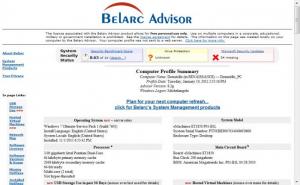
There is no interface you need to navigate here. You only need to run Belarc Advisor and it will automatically have a look at your system. The results will be displayed in HTML format on your web browser. The report provides detailed info about the hardware and software you have installed on your computer, as well as installed or missing Microsoft hotfixes, your antivirus status, security flaws and much more. The report will be saved on your hard drive and won't be sent to any server, so there's no need to concern yourself about any privacy issues.
Belarc Advisor is compatible with most MS Windows versions, from 95, all the way to Win 7, 32 as well as 64 bit. The application also runs great with most browsers out there. Be it Internet Explorer, Firefox, Opera, Chrome, etc, you won't encounter any problems.
Pros:
The application provides any detail you'll need about your computer in under a minute.
Cons:
It's too small to have any downsides.
Without needing to navigate a complex interface or menus, Belarc Advisor will instantly provide you with a full report about your machine.
Getting it running on your computer is a speedy process. The package is just over 3 Mb large. The installation wizard is a bit old looking but it will get the job done in a manner of seconds.
There is no interface you need to navigate here. You only need to run Belarc Advisor and it will automatically have a look at your system. The results will be displayed in HTML format on your web browser. The report provides detailed info about the hardware and software you have installed on your computer, as well as installed or missing Microsoft hotfixes, your antivirus status, security flaws and much more. The report will be saved on your hard drive and won't be sent to any server, so there's no need to concern yourself about any privacy issues.
Belarc Advisor is compatible with most MS Windows versions, from 95, all the way to Win 7, 32 as well as 64 bit. The application also runs great with most browsers out there. Be it Internet Explorer, Firefox, Opera, Chrome, etc, you won't encounter any problems.
Pros:
The application provides any detail you'll need about your computer in under a minute.
Cons:
It's too small to have any downsides.
Without needing to navigate a complex interface or menus, Belarc Advisor will instantly provide you with a full report about your machine.
Do you like Belarc Advisor
Quick Look VideoNew
Popular News
The MATE and Cinnamon editions of Linux Mint 13 Release Candidate have been rolled to the public.
Tell Drinkify what you're listening to and it will tell you what drink to get.
Belarc Advisor Awards
Belarc Advisor Editor's Review Rating
Belarc Advisor has been reviewed by Frederick Barton on
01 Feb 2012. Based on the user interface, features and complexity, Findmysoft has rated
Belarc Advisor
3
out of 5 stars, naming it Very GoodYour Rating
Top Downloads
2.
Opera5.
Trillian8.
AIM9.
Skype10.
Ad-Aware12.
Nero13.
Google Earth14.
Picasa15.
Winamp16.
iTunes17.
RealPlayer18.
uTorrent19.
eMule20.
WinRAR21.
BitComet22.
WinZip23.
Shareaza24.
CCleaner25.
Recuva26.
Tweak UI27.
CuteFTP Home29.
Adobe Reader30.
NewsPiperBecome A Fan!
Link To Us!
Belarc Advisor
HTML Linking Code
HTML Linking Code
Latest Reviews



